
Sellvia: Manage Your Business
SellviaBusiness
3.2377.00 Reviews
- Version
- 2.0.14
- Installs
- 50.00K
- Age Rating
- Everyone
Screenshots




Our Review of Sellvia: Manage Your Business
 Analysis by Appyee
Running an online shop from a phone sounds convenient until a customer needs an answer while you are away from your computer, an order arrives during a busy evening, or another person in the household needs to help without taking over the entire business. Sellvia: Manage Your Business is built for that mobile gap. I tested it as a business app from Sellvia, and my overall impression is that it is most useful as a companion for store owners who want to keep an eye on products and orders while moving through the day.
The app is free and aimed at Everyone, which makes it easy to consider for a shared household device or a small team situation. Still, “easy to access” should not be confused with “safe to share casually.” A store dashboard can expose customer details, product decisions, and order activity, so the way people use it together matters just as much as the interface itself.
Using a store app on a shared household device
A realistic example is a couple running a small online shop from home. One person handles product selection and the other watches incoming orders. When the phone is on the kitchen counter, the second person may need to check whether an order has arrived or whether a product is still available. Sellvia gives that kind of mobile work a practical place, because the core activities are centered on managing products and processing orders rather than browsing a general business news feed.
I would treat it as a working tool, not a casual family app. The Everyone age label describes the broad content suitability, but it does not mean every household member should have unrestricted access to the store account. A child might be able to hold the phone without the app being appropriate for independent business decisions. An adult helper may be trusted to review an order but not to change product information. Those boundaries need to come from the household’s own habits and account security arrangements.
The strongest use case is the owner who already has a Sellvia store and wants a faster way to stay connected to daily operations. Instead of waiting until a laptop is available, I can picture using the phone between errands to review activity, make a quick product-related adjustment, or deal with an order that cannot wait. That does not make mobile management a replacement for every desktop task, but it can reduce the number of times a small seller feels tied to a desk.
For a household, the important question is not simply whether several people can physically use the same phone. It is whether everyone understands what they are allowed to do. A shared device can make coordination easier, but it can also blur responsibility. If a product is changed or an order is processed by the wrong person, the convenience quickly becomes a business risk.
What the mobile workflow is good at
The app’s focus is clear: online-store management, product handling, and orders. That focus is valuable because it keeps the phone useful for the moments that usually create pressure. I would use it for a quick operational check, especially when I need to know whether something requires attention before returning to a longer planning session.
One practical habit is to separate “checking” from “changing.” A household helper can look for new order activity while the owner remains responsible for edits that affect listings or fulfillment. This simple division reduces accidental changes and makes it easier to know who handled a task. It also prevents the app from becoming a confusing shared notebook where several people make updates without telling one another.
Another useful habit is to decide in advance which work belongs on the phone and which belongs on a larger screen. Product organization can become tiring when there are many items, variations, or details to review. A phone is excellent for a quick decision, but a computer may be more comfortable for extended catalog work. Sellvia’s mobile value is therefore strongest when it supports short, purposeful sessions rather than encouraging every store task to happen on a small display.
The best way to use Sellvia is as a mobile control point, not as an excuse to remove every boundary around the business account. That distinction is especially important when the phone is shared by partners, relatives, or temporary helpers.
Setting boundaries before another person uses it
Before handing over the device, I would agree on a short set of rules. Who may open the app? Who may inspect orders? Who may change products? Who is responsible for confirming that a task is finished? These questions sound basic, but they prevent the most common shared-device problem: everyone assumes someone else is watching the store.
I would also avoid leaving the account open where a visitor or child could reach it accidentally. The app is a business tool, and an open session can reveal information that does not belong in casual conversation. Even when people trust one another, access should match responsibility. Trust is not a substitute for a clear routine.
For couples or family members working together, a simple verbal handoff works well. “I checked the orders; you handle product changes” is more useful than silently passing the phone across the room. If a task is urgent, saying what has already been done helps avoid duplicate processing. This is a small coordination improvement, but it matters when two people are trying to keep the same store moving.
I would be particularly careful with a phone that is also used for entertainment, messaging, and general household activity. The more people who pick it up, the easier it is to open the wrong screen or leave the store available for the next person. A separate work device is not essential for every seller, but it becomes more attractive when several people regularly share one handset.
Coordinating products and orders without confusion
Sellvia’s product-and-order emphasis makes it suitable for dividing responsibilities, but the division needs to be explicit. One person might maintain the catalog while another handles order follow-up. That arrangement can work well if both people know when an update is complete. Otherwise, one person may be working from outdated information while the other believes the task has already been handled.
My preferred workflow would be to begin with a quick review, identify the one or two actions that matter most, and finish by telling the other person what changed. On a shared device, this is more reliable than trying to remember every tap later. It also helps a household distinguish between a read-only check and an actual business decision.
A useful trade-off appears here. Mobile access improves responsiveness, but responsiveness can encourage rushed decisions. If an order arrives at an inconvenient time, it may be tempting to process it immediately without checking the wider context. I would use the app to recognize the task and keep the business moving, then slow down for decisions that affect product accuracy, customer expectations, or the store’s overall organization.
For a solo seller, the same principle applies in a different way. The app can reduce the mental load of wondering whether something needs attention, but it should not turn every spare minute into store maintenance. I would set specific moments to check the business rather than repeatedly opening it throughout the day. That makes the mobile tool serve the business instead of allowing the business to occupy every quiet moment.
When several people coordinate, the app is not the whole system. A shared note, a household conversation, or a simple task list may still be necessary for decisions that are larger than a single order. Sellvia can support the operational side, but it should not be expected to replace communication between the people running the shop.
Age, trust, and the meaning of “Everyone”
The Everyone content rating makes the app approachable from an age-classification perspective, and it fits the professional nature of a store-management tool. However, the practical age question is about judgment, not just content. A young person may be perfectly capable of opening the app and reading a product name, while still not being ready to process orders or make changes that affect customers.
In my view, children should only be involved through a clearly limited household role chosen by an adult who owns the store. For example, they might help identify which products need attention while the account holder performs the actual changes. I would not treat the app as a teaching game or a harmless sandbox, because its purpose is real business management.
Adult trust also needs levels. A partner who shares responsibility for the shop may need broad access, while a relative helping for a short period may only need instructions about a single task. The safest arrangement is one in which each person receives the minimum access and responsibility necessary for the job. That is not a criticism of Sellvia specifically; it is a sensible rule for any app connected to an online store.
Households should also agree on what happens when someone stops helping. Remove their access through the account’s normal security process, change shared credentials when appropriate, and make sure the store is not still open on a device they use. The app can be useful in a family business, but the family relationship should not replace basic account discipline.
Where it fits among other business tools
Compared with managing a store only through a browser, a dedicated mobile app feels more direct for quick checks and order-related activity. I do not need to begin with a full desktop workspace when my immediate question is simply whether the store needs attention. That convenience is the main reason I would choose it over relying entirely on a browser shortcut.
Compared with a general notes app or spreadsheet, Sellvia is more closely tied to the store’s actual operating tasks. A spreadsheet can record what a household intends to do, but it does not provide the same focused place for handling products and orders. On the other hand, a spreadsheet may be better for shared planning, cost tracking, or assigning responsibilities, so I would not try to force Sellvia into that role.
Compared with a full desktop commerce platform, the mobile experience is naturally better suited to short sessions and immediate action than to extended administration. Sellers with a large catalog, complicated workflows, or a need for broad reporting may still prefer a computer for the main workday. I see the app as most convincing for small operators who value mobility and already work within the Sellvia environment.
The rating gives a useful signal about expectations: Sellvia currently sits at a 3.2 average from around 700 ratings, with over 50 thousand installs. I would read that as evidence of real interest but also as a reason to approach the app practically rather than assuming it will suit every store. A mobile business app can be helpful while still having moments of friction, especially when a seller expects the phone experience to match a full desktop setup.
Practical questions before making it part of the routine
One question many sellers will have is whether it costs anything to start using. The app itself is free, so the initial decision is relatively easy for someone who wants to test mobile store management. I would still separate the app’s price from any other business costs connected with running an online shop; free installation does not make the wider operation free.
Another question is whether an older phone can run it. The listed minimum operating-system requirement is Android 7.0, which covers a broad range of devices. Even so, I would install it on the actual phone that will be used daily and judge the experience there, particularly if the household relies on an older shared handset.
Users may also wonder which release they are getting. The current version is 2.0.14, so I would check that the installed app is up to date before judging performance or reporting a problem. This matters in a shared household because one person may be using a recently updated installation while another is relying on an older copy or an outdated habit.
It is also worth asking whether this is the right tool for a person who has not yet committed to Sellvia. Since the app is specifically about managing a Sellvia online store, it makes more sense for an existing user or someone actively considering that ecosystem than for a seller who wants a neutral dashboard across unrelated platforms. If your business is spread across several services, a broader management tool may be a better central workspace.
Finally, should a household use one account on one phone or create a more formal working arrangement? I would choose based on responsibility. One owner with occasional help can probably keep the process simple, while two people making regular decisions should establish a clearer division of duties and avoid treating a shared screen as proof that everyone has equal authority.
My household verdict
After looking at Sellvia as both a business utility and a shared-device tool, I see a sensible role for it. It brings store management closer to the moments when small sellers actually need it: during errands, between other tasks, or when a partner notices an order that should not wait until later. The emphasis on products and orders gives the app a clear purpose instead of making it feel like a generic business dashboard.
Its limitations are just as important. I would not choose it as the only workspace for demanding catalog administration, complicated planning, or a business that needs one neutral tool across multiple commerce systems. I would also avoid leaving it open for unrestricted household use. The Everyone rating and free price make the app approachable, but business access still deserves adult judgment and clear boundaries.
For a small Sellvia seller, the app is worth trying as a mobile companion. My advice is to begin with one defined workflow: check orders, review the products that need attention, and communicate what was completed. If that routine saves time without creating confusion, it has earned a place in the household’s business setup. If shared access becomes messy, move the work to a dedicated device or keep the app with the person who is accountable.
Sellvia: Manage Your Business is not a substitute for good coordination, but it can make coordination more immediate. That is where I find its real value. Used with sensible account boundaries, it gives a solo owner or a small household team a convenient way to stay connected to an online store without being permanently tied to a computer.
Verdict
Strengths of Sellvia: Manage Your Business
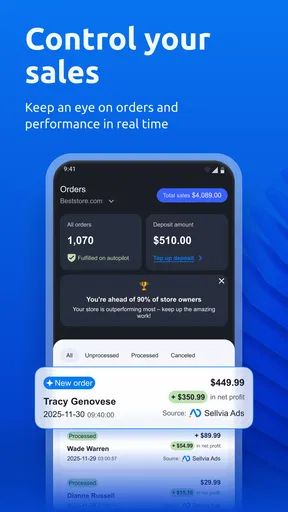
- Simple dashboard for monitoring orders, products, and store activity
- Automates parts of product sourcing and fulfillment workflows
- Useful for managing an online store from a mobile device
- Product catalog tools can reduce manual listing work
- Helpful for entrepreneurs handling multiple store tasks remotely
Limitations of Sellvia: Manage Your Business
- Some advanced features may require a paid Sellvia plan
- Profit margins can vary after shipping, fees, and advertising costs
- Catalog customization may feel limited for highly branded stores
- Dependence on supplier stock can lead to product availability changes
- New users may need time to understand the platform’s workflow
Similar Picks in This Category
View All
LinkedIn: Community & Network
LinkedIn3.8

Zoom Workplace
zoom.com4.1

Microsoft Teams
Microsoft Corporation4.6

Meta Business Suite
Meta Platforms, Inc.4.6

Webex Meetings
Cisco Systems, Inc.4.5

TeamViewer Remote Control
TeamViewer4.4
Frequently Asked Questions
What is Sellvia: Manage Your Business used for?
Sellvia: Manage Your Business is designed to help online sellers manage key parts of a dropshipping or e-commerce operation from a mobile device. Depending on your account and plan, you can review products, monitor orders, check business activity, and stay informed about store-related updates without constantly using a desktop dashboard. It is mainly useful for merchants who already use Sellvia services and want convenient access while away from their computer.
Do I need a Sellvia account or subscription to use the app?
Yes, the app is primarily intended for existing Sellvia users, so you will generally need to sign in with a Sellvia account before accessing its business tools. Some features may depend on the subscription, store setup, integrations, or services enabled on your account. Before downloading, it is worth checking Sellvia’s current pricing and plan details, because installing the app alone does not necessarily provide access to every available function.
Can I manage orders and products directly from my phone?
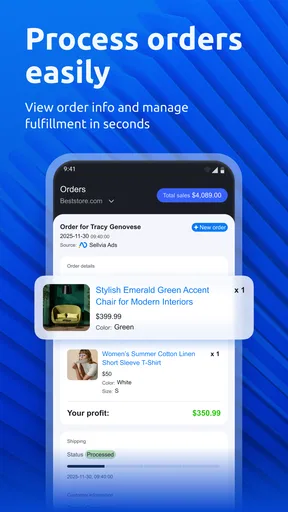
The application is intended to provide mobile access to common store-management tasks, including reviewing order information and keeping track of products or business activity. However, the exact controls available can vary according to your Sellvia plan and connected store configuration. More advanced catalog editing, detailed settings, integrations, or extensive product research may still be more comfortable or available through the web-based Sellvia dashboard.
Is Sellvia: Manage Your Business suitable for beginners?
The app can be helpful for beginners who already understand the basic idea of running an online store, because it brings important account and store information into a simpler mobile interface. Nevertheless, it is not a complete course on e-commerce or dropshipping. New users may need to learn about product selection, advertising, customer support, shipping, returns, and profit margins separately before relying on Sellvia to operate a business.
Are there any important limitations to consider before downloading?
Before downloading, remember that Sellvia: Manage Your Business is a companion tool rather than a guaranteed all-in-one solution for online selling. Its usefulness depends on your Sellvia account, connected store, internet connection, and the availability of specific features in your region or plan. You should also review permissions, privacy information, subscription costs, shipping conditions, and customer-support policies before using it for regular business operations.
